
VeloPDF
VeloRead is the focused reading workspace inside VeloPDF
A fast, privacy-first PDF workspace for focused reading, annotation, notes, and document clarity.
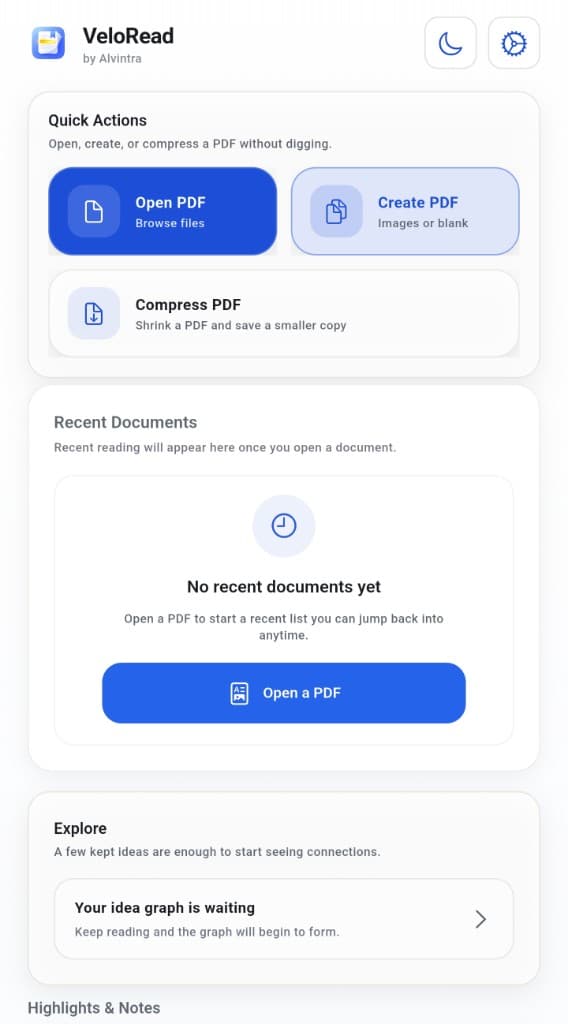
Fast reading
Quick entry into documents.
Highlight & annotate
Mark what matters.
Notes workspace
Thinking stays close.
Create PDF
Start from blank pages or images.
Local-first privacy
Documents stay close.
Export & share
Deliberate output when needed.
Sign documents
Practical signing for paperwork.
Compress PDFs
Smaller files for lighter transfer.
Fast reading
Quick entry into documents.
Highlight & annotate
Mark what matters.
Notes workspace
Thinking stays close.
Create PDF
Start from blank pages or images.
Local-first privacy
Documents stay close.
Export & share
Deliberate output when needed.
Sign documents
Practical signing for paperwork.
Compress PDFs
Smaller files for lighter transfer.
Built for focused reading
Fast enough to feel light, calm enough to stay with longer documents.
VeloPDF is meant to feel like a private PDF reader first: quick to open, easy to return to, and quiet enough that the document stays in charge.
Fast opening
Get into documents quickly and keep the reading surface calm.
Search inside PDFs
Find the line you need without turning the page into a hunt.
Continue where you left off
Recent files and reading continuity keep context close.
Quiet interface
Less chrome, less friction, more room for the document.
Highlights, notes, and thinking
Keep reading close to the page.
Keep important passages visible
Highlights stay attached to the document so useful reading does not disappear after the first pass.
Notes stay close to the page
VeloRead is the focused reading workspace inside VeloPDF, giving notes a natural place beside the PDF.
Reading clarity over tool drama
The goal is understanding and review, not a noisy editing surface.
Practical PDF tools
Useful document utilities around reading, without pretending to be the whole story.
Create, sign, compress, extract, export, and share when the workflow moves beyond reading.
Create PDFs
Sign documents
Compress files
Extract text
Export & share
Supported updates
Local-first privacy
A private PDF workspace should not make cloud dependence feel mandatory.
Download VeloPDF
A calm PDF workspace for focused reading, notes, and practical document clarity.
Live on Play Store · iOS coming soon
VeloPDF
VeloRead is the focused reading workspace inside VeloPDF
A fast, privacy-first PDF workspace for focused reading, annotation, notes, and quiet document clarity.
No forced login. No mandatory cloud. Read PDFs quickly, keep your place, highlight what matters, think close to the page, and use practical document tools when the workflow moves beyond reading.
Calm document workspace
Reading, notes, and practical document tools kept in one quiet surface.
Built for focused reading
Fast enough to feel lightweight, calm enough to stay with longer documents.
VeloPDF is meant to feel like a private PDF reader first: quick to open, easy to return to, and quiet enough that the document stays in charge.
Quick entry
Fast opening, smooth reading
Resume in placeVeloPDF is built to get into documents quickly and keep the reading surface calm once you are there.
Find what matters
Search inside the PDF
Quiet navigationFind the passage you need without turning a focused reading session into a slow hunt through long files.
Stay oriented
Continue where you left off
Recent filesRecent documents and reading continuity help VeloPDF feel like a workspace you return to, not a one-off utility.
Calm by default
A quieter interface
Document firstThe UI stays light on noise so contracts, study material, manuals, and reference files remain the center of attention.
Highlight, annotate, and think
Turn documents into understanding without turning the app into noise.
VeloRead is where reading, highlights, notes, and review come together inside VeloPDF. It is designed to help important passages stay visible and personal thinking stay close to the source material.
Reading memory
Highlights that stay useful
Mark important passages, revisit them later, and keep emphasis attached to the document instead of buried in a separate workflow.
Thinking surface
Notes close to the page
VeloRead is the reading workspace inside VeloPDF, giving notes and thinking room a natural place beside the PDF.
Calm review
Reading clarity over tool drama
The goal is to turn documents into understanding with calm review surfaces, not overwhelm the page with editing chrome.
Workspace architecture
The reading surface, annotation layer, and note-taking layer are meant to feel connected. That is the core product architecture: reading first, practical thinking tools second, and only the utilities that support the workflow around them.
Reading surface
View / Search / ResumePDF viewing, search, recent files, and continuation are designed to make returning to a document feel immediate.
Annotation layer
Highlight / Note / ReviewHighlights, notes, and review surfaces stay close to the reading flow so important passages remain usable later.
Document utilities
Create / Sign / ExportCreate, sign, compress, export, and share tools support practical document jobs without turning VeloPDF into a heavyweight editor.
Reader
A calm surface for reading, searching, and keeping continuity across documents.
Annotations
Highlights and markup stay reviewable so emphasis does not disappear after the first pass.
Notes
Notes give the document a thinking layer, helping raw reading turn into usable context.
Practical document tools
Useful utilities around reading, without pretending to be a heavyweight editor.
Editing support in VeloPDF is aimed at practical updates and document workflows: creating, signing, filling, organizing, compressing, exporting, and sharing where those jobs matter.
Lightweight utility
Create PDFs
Create a PDF from blank pages or images when you need a simple document starting point.
Practical signing
Sign documents
Handle signatures as a practical utility for everyday paperwork rather than a heavyweight document suite.
Supported updates
Fill forms
Complete supported PDF forms and make routine updates without leaving the calm workspace.
Document order
Page tools
Merge, split, extract, delete, rotate, and reorder pages for document housekeeping and review.
Smaller files
Compress files
Reduce file size when you need lighter sharing, storage, or transfer.
Useful extraction
Extract text
Pull text out of a document when a passage needs to move into notes, messages, or another workflow.
Deliberate output
Export and share
When the document needs to leave the device, export and share it deliberately.
Privacy-first by design
A private PDF reader should not make cloud dependence feel mandatory.
VeloPDF is built around local-first document workflows where possible. Reading data, highlights, notes, and related workspace context are meant to stay on the device unless you explicitly export or share them.
Third-party services are kept narrow: Google Play Billing for purchases, RevenueCat for subscription validation, and Google AdMob in the free version. VeloRead Plus removes ads.
What this means in practice
- No forced login to start reading your documents
- No mandatory cloud storage for the core reading workflow
- Documents, highlights, notes, and reading data stay local unless you export or share them
- Third-party services are limited to platform billing, subscription validation, and ads in the free version
How it fits real workflows
A document tool that works across quiet reading sessions and practical output tasks.
Read and think
A quiet workflow for study, review, research, and personal reference documents.
- 1Open the PDF
- 2Read and search
- 3Highlight key passages
- 4Add notes in VeloRead
- 5Return later with context intact
Make practical updates
A utility path for the jobs that sit around reading: creating, signing, compressing, and sharing.
- 1Create or import
- 2Fill or sign
- 3Use page tools
- 4Compress if needed
- 5Export or share
Quiet ownership
A calm PDF workspace for Android, built around local ownership and thoughtful document workflows.
VeloPDF is meant to feel lightweight, private, and useful before anything else: a place to read quickly, think close to the page, and only reach for document utilities when the job actually calls for them.